

What if the AI tool that creates the fastest first draft is the wrong one for building your digital product? An ai digital product creator can help shape your expertise into a useful asset, but a draft is only the start. You still need to review the content, prepare it for buyers, and decide what happens after checkout.
Strong AI features matter, but they’re only one part of the workflow. If creating a product leaves you juggling separate tools for editing, formatting, hosting, delivery, and follow-up, those handoffs can become the work. You also need the chance to check facts, keep your voice, and make the final quality decisions yourself.
This guide shows you how to evaluate an AI digital product creator by the complete process it supports, not just the speed of its first draft. You’ll learn what to look for in creation and editing, and how to assess storefronts, integrated checkout, digital delivery, and post-purchase email. Genesize brings these steps together in one DIY platform, with your expertise at the center of the product.
Key Takeaways
- Judge an ai digital product creator by whether it helps you shape, review, format, and prepare an asset, not just generate a draft.
- Build a selection checklist around your workflow, separating essential creation and delivery needs from optional AI features.
- Compare standalone generators with connected platforms by considering the handoffs required for checkout, delivery, and buyer follow-up.
- Keep your expertise in the process: choose one audience problem, use AI to develop the asset, then review and refine the finished product.
- See how Genesize brings AI-assisted creation together with a hosted storefront, checkout, digital delivery, and post-purchase follow-up.
What an AI Digital Product Creator Does, and What It Should Help You Finish
An ai digital product creator uses AI-assisted workflows to help you shape, organize, format, and prepare digital assets. The useful measure isn’t how quickly it produces text. It’s whether you can turn your knowledge into a clear, reviewed product that’s ready to package for buyers.
A practical definition: An AI digital product creator helps you move from your knowledge and source material to a finished asset by supporting creation, review, and packaging. You remain responsible for its accuracy and readiness for sale. The underlying technology, Generative artificial intelligence, can produce new content from prompts and other inputs. But generating content is only one part of making a useful product.
Which digital products can an AI creator help you prepare?
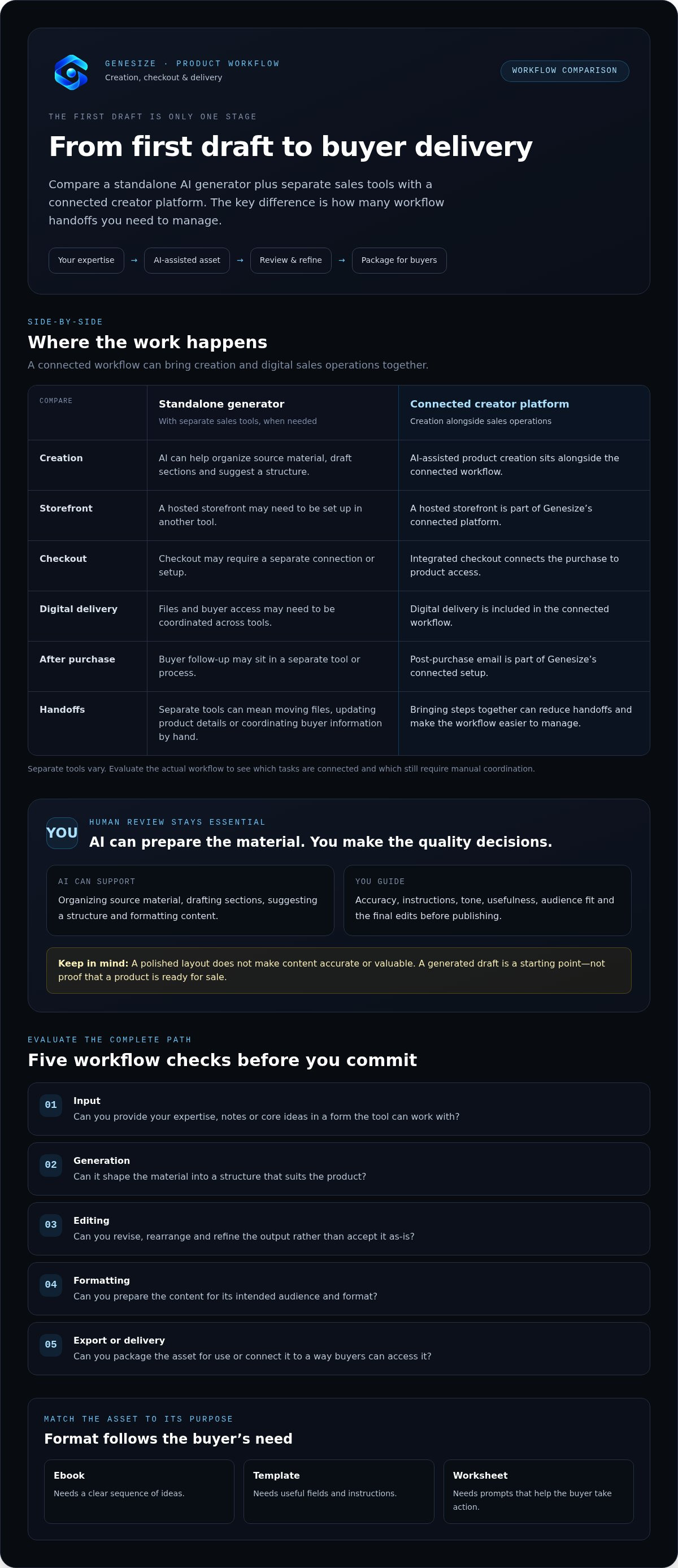
Depending on the workflow, you might use AI assistance to develop an ebook, practical guide, template, worksheet, or another downloadable resource. Each format calls for different decisions. An ebook needs a clear sequence of ideas. A template needs useful fields and instructions. A worksheet needs prompts that help the buyer take action.
Choose a tool with the format and intended buyer in mind. Start by defining what the buyer should understand or do after using the resource. Then look for features that help you organize and present the material for that purpose. For example, notes from a workshop might become a step-by-step guide, while a repeatable process might work better as a template. The goal here is to assess the creator workflow, not to replace a dedicated ebook or guide-building tutorial.
Where AI helps, and where your expertise still matters
AI can help organize your source material, draft sections, suggest a structure, and format content into an asset. Your expertise gives that asset its substance. You know which advice fits your audience, which examples make a point clear, and where a draft needs correction or more context.
Review the content before treating it as finished. Check facts, instructions, tone, usefulness, and audience fit. A polished layout can make a weak idea look complete, but presentation alone doesn’t make the content accurate or valuable.
- AI supports the work: organizing, drafting, and preparing your material.
- You guide the decisions: refining the message, checking accuracy, and shaping the product for its intended buyer.
A generated draft is a starting point, not proof that a product is validated or sale-ready. Look for a workflow that lets you edit and refine the content. Then judge the result by whether it addresses a real buyer need in a clear, usable format.
How to Evaluate an AI Digital Product Creator Before You Commit
Evaluate the whole path from your source material to the buyer’s hands. A useful ai digital product creator should help you move through each step while keeping you in control of the content. Before committing, try the workflow with a real product idea rather than judging it only by a feature demo.
Use this checklist:
- Input: Can you give the tool your expertise, notes, or core ideas in a form it can work with?
- Generation: Does it help shape the material into a structure that suits the product?
- Editing: Can you revise, rearrange, and refine the output rather than accept it as-is?
- Formatting: Can you prepare the content for its intended audience and format?
- Export or delivery: Can you package the asset for use or connect it to a way buyers can access it?
Prioritize features that remove repeated friction from your workflow. A flashy generator or extra design effect may be convenient, but it matters less than the ability to improve the content, prepare the asset, and get it to buyers without avoidable manual steps.
What creation and editing capabilities should you compare?
Start with how the tool turns your knowledge into structured content. Check whether you can shape sections, change their order, and edit wording in the same workflow. Then review the output as a buyer would: Is it clear, usable, and presented in a format that fits its purpose? Make sure you can make final edits before publishing. For background on current copyright work related to AI-generated material, consult the Copyright Office's AI initiative.
How do storefront, checkout, and delivery fit into the evaluation?
Creation is only one stage. Consider whether the platform can present a digital product through a hosted storefront, connect checkout to access, and deliver the asset after a successful transaction. If those steps sit in separate tools, you may need to move files, update product details, or coordinate buyer information by hand. A connected workflow can reduce those handoffs and make the process easier to manage.
Keep quality in your hands, too. The tool should make review and refinement part of the process, not hide the content behind a finished-looking package. Check important details and make sure the final version reflects your knowledge and the needs of its intended audience.
Selection rule: Choose the tool that removes repeated friction across creation, review, packaging, and delivery while leaving you in charge of the final product. To explore a connected DIY workflow, visit Genesize's digital product platform.
Standalone AI Generator or Connected Creator Platform: What Fits Your Workflow?
A generation-only tool focuses on making content or assets. A connected creator platform carries more of the work forward by linking product creation with a storefront, checkout, digital delivery, and buyer follow-up. Neither approach fits everyone. The better choice depends on the tools you already use and where your process slows down.
When can a standalone AI tool be enough?
If you already have a reliable storefront, checkout, delivery process, and follow-up system, a standalone generator may fill the gap you actually have. It can also suit a focused task, such as drafting or structuring material, when you prefer to manage the rest with tools you know.
The trade-off is coordination. You may need to move the finished asset into another system, enter product details again, and manage buyer information separately. Those handoffs can be manageable if your process is established. If you repeat them for every product, they can add ongoing administrative work.
When does an integrated digital product platform make sense?
An integrated platform connects creation with the steps that follow: presenting a digital product in a hosted storefront, taking payment through checkout, delivering the asset after a successful transaction, and managing post-purchase communication. That connection can reduce repeated setup and manual transfers. It doesn’t remove your need to review the product or make decisions about its content.
Some creators worry that a connected platform could limit their choices. Treat that as a workflow question, not an automatic drawback. List the tools and steps you rely on, then consider whether the platform’s process supports them and preserves your control. The impact of GenAI on creative industries also underscores why human judgment remains part of using AI in creative work.
| Approach | Workflow coverage | Handoffs | Creator control |
|---|---|---|---|
| Standalone generator | Focused on generating or shaping an asset | Creator coordinates storefront, checkout, delivery, and follow-up tools | Can fit a workflow built from tools the creator already uses |
| Connected platform | Can link creation with selling and post-purchase steps | May reduce repeated transfers and setup between systems | Evaluate whether you can review content and manage the process yourself |
Map your current process before you choose. If content generation is your only bottleneck, a focused tool may be enough. If disconnected sales steps take time, a connected ai digital product creator may better match your workflow. Explore Genesize’s connected digital product workflow as one way to bring those stages together.
A Practical Workflow: Turn Your Expertise into a Reviewed, Sale-Ready Digital Asset
A useful digital product starts with an audience need and ends with an asset you’ve reviewed and prepared for buyers. An ai digital product creator can help with the work in between, but you supply the knowledge, make the editorial calls, and approve what goes out.
- Choose one audience problem. Define who the product is for and what practical problem it should help them address. Keep the focus narrow enough that you can explain the product’s purpose in a sentence. Detailed idea validation belongs in its own process.
- Gather your source material. Collect relevant notes, examples, frameworks, and expertise before prompting. Strong inputs give you more useful material to shape than a vague request alone.
- Outline the outcome. Map the main sections or steps the buyer needs. Check that each one supports the intended result, and remove anything that distracts from it.
- Generate and organize a draft. Use AI assistance to structure your material and develop sections. Treat the output as working content, not a finished product.
- Review and edit. Check accuracy, clarity, tone, and audience fit. Add context or examples only you can provide, correct unsupported claims, and revise anything that doesn’t help the buyer.
- Package and prepare for delivery. Check that the final digital format is readable, complete, and easy to use. Detailed packaging decisions can be handled separately; focus here on whether the asset is ready to present and deliver.
AI can draft the material, but only human review can decide whether it’s accurate, useful, and ready to publish. That review isn’t a final formality. It’s where your judgment turns generated content into a product that reflects your expertise.
Then connect the finished asset to the buying process. A hosted digital storefront can present the product, checkout can handle the transaction, and digital delivery can provide access after successful payment. With a connected workflow, you can prepare the content and the steps that follow without treating them as unrelated tasks.
Keep the process practical: solve one problem, use your knowledge, refine the draft, and approve the package before it reaches buyers. Build and deliver digital products with Genesize using a workflow that brings AI-assisted creation, hosted checkout, and digital delivery together.
How Genesize Connects AI Product Creation with Digital Sales Operations
The selection framework leads to a practical question: can your creation tool support the work that comes after the asset is drafted? Genesize brings AI-assisted product creation together with digital sales operations, connecting preparation, purchase, delivery, and buyer follow-up in one DIY platform.
What the Genesize workflow brings together
Use AI tools to generate, structure, format, and package digital assets. You bring the ideas and expertise, review the material, make editorial decisions, and approve the final product. AI supports the process, while you remain responsible for accuracy, usefulness, and quality.
Once your asset is prepared, present it through a hosted digital storefront with integrated checkout. After a successful transaction, the digital product is delivered to the buyer. Native buyer contact management and automated post-purchase email follow-up connect the sale to the next communication step.
- Create: Use AI-assisted tools to shape and prepare digital assets.
- Present and sell: Set up a hosted storefront and integrated checkout for digital products.
- Deliver and follow up: Provide digital delivery after purchase and manage buyer contacts and post-purchase emails.
This is the difference between using an AI digital product creator for a draft and choosing a platform that connects creation with the operations around a digital sale. The workflow brings the stages together, while you stay responsible for the product itself.
What to do next if the workflow fits your needs
Map your current process from the first source notes to the buyer’s follow-up email. Mark where you create, edit, package, list, take payment, deliver, and manage customer communication. Then compare that sequence with the connected workflow. Which steps already work well? Where do you repeat setup or move information between tools?
Use the comparison to decide whether an integrated platform fits your needs better than your existing tool stack. Focus on the practical handoffs it could reduce, and make sure the creation process gives you room to review and shape the final asset.
If you’re ready to explore a connected workflow for creating and selling digital products, Explore Genesize.
Build a Workflow That Carries Your Product Further
The right ai digital product creator should do more than produce a first draft. Choose one that helps you shape and package your expertise while keeping you responsible for review, accuracy, and the final product.
Look beyond generation when you compare tools. Consider how your asset moves from creation to storefront, checkout, delivery, and buyer follow-up. A connected workflow can reduce manual handoffs between those steps, while a standalone tool may suit you if the rest of your process is already working well.
Genesize brings AI-assisted digital asset creation and packaging together with hosted storefronts, integrated checkout, and digital delivery. Native buyer management and automated post-purchase email follow-up extend the workflow beyond the sale. You remain in control of the expertise and editorial decisions that make the asset yours.
Map your current process, identify the steps that create friction, and see whether a connected platform fits. Explore Genesize and see how creation connects to digital sales. You have the knowledge to build something useful. Choose a workflow that helps you carry it through.
Frequently Asked Questions
What is an AI digital product creator?
An AI digital product creator is software that helps you turn ideas or expertise into digital assets using AI-assisted workflows. It may help structure content, draft material, format it, and prepare it for packaging. A complete creation process still depends on your input and review. The tool can help develop an asset, but you decide whether it’s accurate, useful, and suitable for the people you want to reach.
Can I create a digital product with AI if I am not a writer?
Yes. You can start with knowledge you already have, such as notes, examples, or a process you teach, and use AI to help organize and draft it. You don’t need to begin with polished prose. Give the tool clear information about the intended buyer and the result you want the product to support. Then revise the draft so it reflects your expertise and reads clearly.
Is AI-generated digital product content ready to sell without editing?
No. Generated content is a draft, not a quality check. Review facts, instructions, examples, clarity, tone, and audience fit before packaging it for buyers. AI may miss context or produce material that sounds plausible but doesn’t reflect your expertise. Edit unclear sections, correct errors, and remove anything that doesn’t help the buyer. Your review helps make the asset useful and ready to present.
What types of digital products can an AI creator help me make?
An AI creator can help prepare ebooks, guides, templates, worksheets, and other downloadable resources. The best format depends on what the buyer needs to learn or do. A guide may need a clear sequence of steps, while a template needs practical fields and directions for using them. Choose the format first, then shape and review the content to fit how buyers will use it.
How does an AI digital product creator connect to checkout and delivery?
Some platforms connect product preparation to a hosted storefront and integrated checkout. After a buyer completes a successful transaction, the digital asset can be delivered through the platform. This connects the product with the purchase process instead of leaving you to transfer files manually. When comparing tools, look at how product setup, checkout, access, and delivery fit together.
How much does an AI digital product creator cost?
Costs depend on the platform’s pricing model and what its plan includes. Some tools focus only on AI generation, while others combine creation with storefront hosting, checkout, delivery, or customer follow-up. Compare the ongoing subscription with the cost of any separate tools you’d still need, rather than judging by the generation feature alone. Genesize operates as a subscription software platform, so include its connected workflow in your evaluation.
Can one platform handle product creation, sales, and customer follow-up?
Yes. A connected platform can bring AI-assisted asset creation together with a hosted storefront, integrated checkout, digital delivery, buyer contact management, and automated post-purchase email follow-up. Genesize combines these steps in a DIY digital sales platform. You still provide the expertise, review the content, and approve the final product. Map your current process and compare it with a connected workflow to see whether it fits your needs.