

What if your most useful digital product isn’t everything you know, but one professional decision you can help someone make with confidence? Learning how to package professional knowledge into digital product form starts with that shift: from covering a whole field to guiding a specific audience toward a clear outcome.
If your expertise feels too broad, choosing what to include can be harder than creating the product itself. And narrowing your focus doesn’t mean stripping away the judgment that makes your work valuable. It means showing where your guidance applies, what choices matter, and how someone can put it into practice.
This guide will help you choose an audience and outcome, identify the knowledge that serves them, and shape it into a usable format such as a guide, template, or short course. You’ll also learn a practical way to build a first version, using AI tools to organize and package your expertise while keeping your examples and professional judgment at the center.
Key Takeaways
- Start with one reader’s problem and the progress they need to make, rather than trying to cover your entire field.
- Gather repeated questions, decision points, checklists, and anonymized examples to find the practical knowledge worth sharing.
- Choose a guide, template, workbook, or lesson structure based on what the learner needs to do, not what looks most impressive.
- Use AI to organize and format a first draft, then apply your professional judgment to review the advice, examples, and nuance.
- To package professional knowledge into digital product form, connect the finished resource with a clear description, checkout, delivery, and helpful follow-up.
Package Professional Knowledge by Starting with a Specific Reader Outcome
Your expertise may span years of decisions, exceptions, and hard-won lessons. A useful digital product doesn’t need to contain all of it. It needs to help a particular reader make progress on a particular problem.
A digital knowledge product is a structured resource that turns expertise into practical steps for a specific audience to achieve a defined outcome. This definition keeps the work grounded: start with a real learner need, then select and arrange the knowledge that helps meet it. The principles behind instructional design models can also help you think systematically about the learner, the objective, and the path between them.
Choose one audience and one problem to solve
Describe your intended reader by role, experience, and immediate challenge. “New managers” is a start; “first-time managers preparing for difficult performance conversations” gives you a clearer person and task. Ask what they need to decide, do, or understand next. That’s the problem your product should address.
Keep adjacent topics on a “later” list. A product for preparing a performance conversation doesn’t also need to cover hiring, team strategy, and every aspect of workplace communication. A narrower scope gives the reader a usable path without suggesting those other subjects are unimportant.
Turn expertise into a clear product promise
Write a promise around an action the reader can take. For example: “Use this guide to prepare a clear agenda for a performance conversation.” The statement connects a defined reader need to a practical result. It also gives you a test for each piece of content: does it help the reader take that action?
Set boundaries. The guide might help someone prepare, but it can’t predict another person’s response or replace judgment about a sensitive situation. Naming those limits makes the promise credible and preserves the nuance of your work. Include the context, decision points, and exceptions that help readers adapt the guidance rather than follow it blindly.
To package professional knowledge into digital product form, focus on the repeatable decisions behind your expertise, not just the information you can share. Your experience remains central: you choose which principles apply, where a reader should pause, and when a situation calls for a different approach. A focused outcome doesn’t flatten professional judgment. It gives that judgment a clear structure readers can use.
Extract and Organize Your Professional Knowledge into a Useful Learning Path
Once you know the outcome your product should support, gather the knowledge that helps a reader reach it. Don’t begin by drafting chapters from memory. First, surface the decisions, explanations, and examples you use in real work. A repeatable process makes that expertise easier to shape into something another person can follow.
Capture the decisions and examples behind your expertise
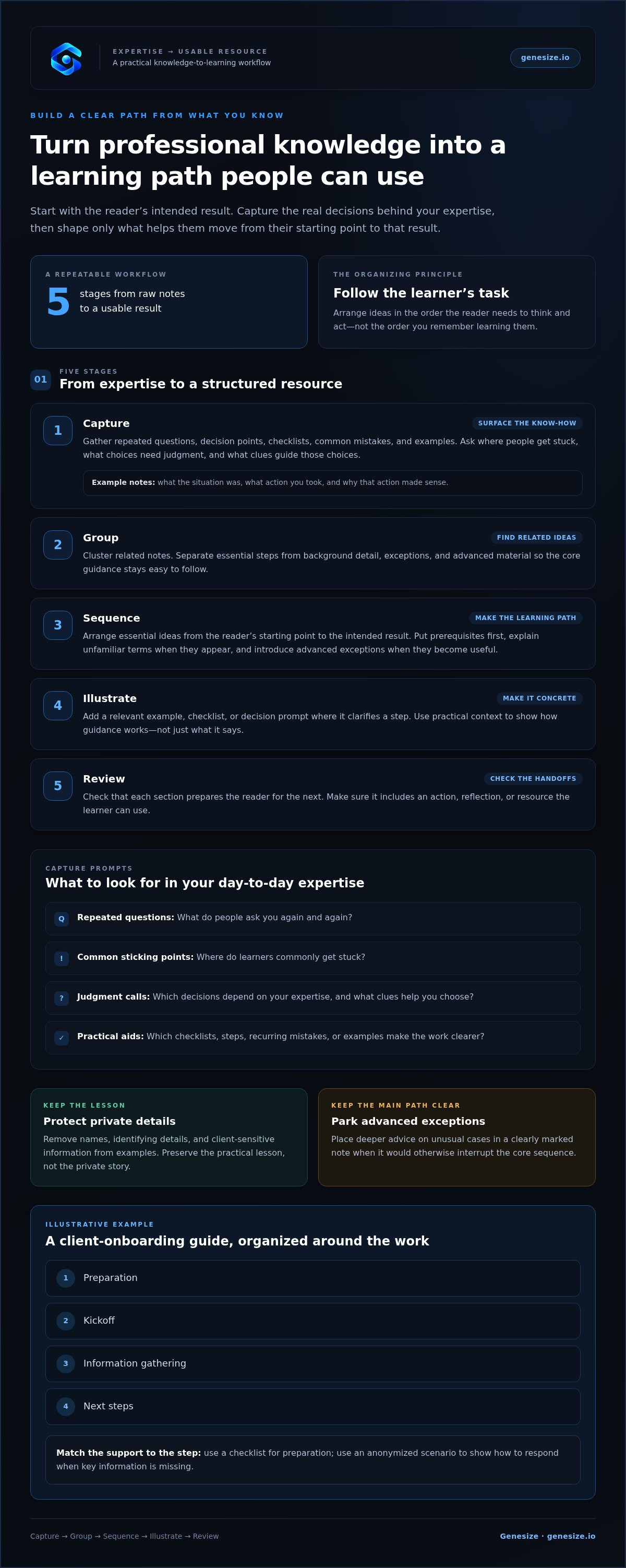
Start with prompts that draw out more than general advice: What do people ask you repeatedly? Where do they commonly get stuck? Which decisions require your judgment, and what clues help you choose a course of action? Note useful checklists, steps, and recurring mistakes alongside your answers.
For each example, record the situation, the action you took, and why it made sense. Remove names, identifying details, and client-sensitive information. Keep the lesson, not the private story. These notes reveal what your knowledge looks like in practice, including the context that a bare instruction might leave out.
Sequence knowledge from first step to usable result
Organize your notes into a few stages that match the learner’s task. Put prerequisites first, explain unfamiliar terms when they appear, and save advanced exceptions for the point where they become useful. Vanderbilt University’s online course development process offers a reference for structuring course materials around learner progress.
A useful learning path follows the order in which the reader needs to think and act, not the order in which the expert remembers learning.
Use this workflow to turn raw notes into a clear structure:
- Capture: Collect questions, decisions, checklists, common mistakes, and anonymized examples.
- Group: Cluster related notes, then separate essential steps from background detail, exceptions, and advanced material.
- Sequence: Arrange the essential ideas from the reader’s starting point to the intended result.
- Illustrate: Add a relevant example, checklist, or decision prompt where it helps clarify a step.
- Review: Check that each section prepares the reader for the next and includes an action, reflection, or resource they can use.
For example, a consultant creating a guide to client onboarding might group notes into preparation, kickoff, information gathering, and next steps. A checklist can support preparation, while an anonymized scenario can show how to respond when key information is missing. Deeper advice on unusual cases can sit in a clearly marked note rather than interrupting the main sequence.
As you organize your material, AI-assisted creation tools can help sort and shape source notes, while you retain control of the reasoning and final review. If you’re ready to turn your outline into a digital resource, explore Genesize’s digital product creation tools as one way to support that workflow.
Choose a Digital Product Format That Fits the Knowledge and the Learner
The right format makes the reader’s next step easier. It doesn’t need to look elaborate or include every possible teaching feature. Match the format to what someone needs to understand or do, then add only the depth that helps them reach the intended outcome.
Match the format to what the reader needs to do
A guide works well when readers need a clear explanation or repeatable sequence. A template or workbook suits a task that requires them to apply ideas to their own situation. Structured lessons make sense when learners need staged practice, demonstrations, or feedback built into the learning process.
| Format | Best suited to | Reader interaction |
|---|---|---|
| Guide | Explanations, principles, or a repeatable process | Read, follow steps, refer back |
| Template | A task with a reusable structure or starting point | Fill in, adapt, and apply |
| Workbook | Reflection, planning, or decisions specific to the reader | Answer prompts and complete exercises |
| Structured lessons | Topics that need sequenced practice or demonstrations | Learn, practise, and progress through stages |
These formats can also work together. A short guide might explain a process, while a worksheet helps readers use it. Choose a combination only when each part supports the outcome. Extra components add work for you and can make the product harder to use.
Set a manageable first-product scope
You don’t need to start with a full course. A course is useful when the subject genuinely requires several stages of learning, repeated practice, or demonstrations. If readers need one clear explanation or a tool for a defined task, a focused guide, template, or workbook may serve them better. Build for the learning need, not the assumption that a bigger format carries more value.
Define the first version with three boundaries: one audience, one core outcome, and a limited set of supporting ideas. For example, an independent consultant who helps small teams plan projects could create a reusable project-planning template with brief instructions, rather than a broad course on every aspect of project management.
Set a useful completion point: what should the reader be able to understand, decide, or do by the end? Keep essential guidance in the main resource. Move specialist detail into optional references when it interrupts the central path. To package professional knowledge into digital product form effectively, make each format choice serve the learner’s task, not the size of your expertise.
Build and Review a First Version Without Losing Professional Judgment
A first version is a working resource, not a final verdict on your expertise. Build it in stages so you can check the substance before polishing the presentation. A practical sequence is: turn your outline into a draft, format it for the chosen product, review every part as the expert, then ask intended readers to try it.
Use AI as a production aid, not a substitute for expertise
AI tools can help organize notes, rephrase explanations, and format material into sections. Give the tool your source notes and clear instructions about the audience, outcome, and boundaries. Ask it to work from the material you provide, not to fill gaps with general advice. Treat each result as a draft that needs your approval.
Check for inaccurate statements, missing context, unsupported claims, and wording so generic it could apply to anyone. Add the examples and judgment that show how the guidance works in real situations. You remain responsible for the advice and for explaining when a different approach may be needed.
Review the product from the reader’s point of view
Before publishing, invite a small number of intended readers to complete one section or use a tool. Watch where they pause. Ask what they expected to happen, which instructions felt unclear, and what information they needed but couldn’t find. Their hesitation can reveal a missing prerequisite or a step that makes sense to you only because of your experience.
Then revise the draft and its promise together. If readers can follow the resource but can’t achieve the stated outcome, narrow or clarify the promise. If the outcome is realistic but the steps are confusing, improve the explanation, sequence, or examples.
Use this checklist before you share the product:
- Usefulness: Does each part help readers make progress?
- Accuracy: Have you checked every claim, instruction, and example?
- Clarity: Can readers understand the steps and any necessary limits?
- Next actions: Does the resource show what to do, decide, or review next?
A product is ready for its next review when it’s useful, accurate, clear, and gives the reader a practical next action. To package professional knowledge into digital product form, keep your expertise in the review loop at every stage. Genesize’s AI-assisted creation tools can help you shape and format a draft while you retain control of the content. Start creating your digital product.
Prepare Your Knowledge Product for Delivery and Keep the Workflow Connected
A finished resource needs a clear path from your workspace to the buyer. The asset, its description, checkout, and delivery all shape the experience. Before launch, walk through each step as if you were a customer who has never seen the product before.
Make the product ready for a clear buyer experience
Prepare the file, then make its purpose easy to understand. Choose a descriptive title and write a short description that tells the reader who the resource is for, what it helps them do, and what it contains. Be precise. The description should set expectations that match the product itself.
Review the asset for practical details: can readers open and use the file, follow the section order, and access any included links? Add brief instructions where the next step might not be obvious. A useful resource can still frustrate buyers if they can’t figure out how to begin.
Then test the purchase-to-delivery flow before directing people to the product. Complete the steps from checkout through delivery and confirm that the buyer receives the correct asset and knows what to do with it. This simple check helps catch gaps in both the file and the buying experience.
Use connected tools to move from creation to follow-up
Once the content is ready, the supporting workflow can stay connected. Genesize is a DIY platform with AI-assisted digital product creation and packaging tools, a hosted storefront with integrated checkout, and digital delivery. AI can help structure and prepare the resource, while you remain responsible for its substance, accuracy, and professional judgment.
After purchase, customer management and automated email follow-up can help you keep buyer communication organized. For example, a post-purchase message can reinforce where to start or point customers toward instructions included with the resource. Keep those messages relevant to the product and useful to the person who has just bought it.
Think of the process as a short sequence: finalize the asset, prepare its description, set up checkout, and test delivery. Clear instructions and a usable file are not finishing touches. They’re part of the product experience.
To package professional knowledge into digital product form, connect the quality of your resource with a delivery process that’s just as clear. Explore the Genesize platform to see how its creation, storefront, checkout, delivery, and follow-up tools can support your workflow.
Turn Your Expertise into a Useful First Product
A focused digital product starts with a reader’s need, not everything you know. Choose one audience and a practical outcome, then arrange your expertise into steps they can follow. Select a guide, template, workbook, or set of lessons based on the task. Keep your professional judgment in the process as you draft, review, and refine the resource.
To package professional knowledge into digital product form, aim for a clear promise and a usable first version, not a complete library of your expertise. Check that the content is accurate, the instructions make sense, and the delivery experience is easy to follow.
Genesize brings practical workflow tools together, including AI-assisted product creation and packaging, a hosted storefront with integrated checkout and digital delivery, and customer management with automated post-purchase email. You stay responsible for the knowledge. The tools can help you shape, sell, and deliver it.
Explore Genesize and build your digital product workflow. Start with one valuable outcome, then build from there. Your experience has a useful shape when you give it a clear place to begin.
Frequently Asked Questions
What professional knowledge can I turn into a digital product?
You can turn repeatable processes, specialist explanations, decision frameworks, checklists, and anonymized examples into a digital product. Start with material that helps a defined audience handle a real task, such as preparing for a client meeting or reviewing a project plan. Choose knowledge you can explain clearly and support with practical guidance. Review every example yourself, and remove confidential or identifying details before sharing it.
How do I know if my expertise is specific enough for a digital product?
Your expertise is specific enough when you can name an audience, a recurring problem, and a result your resource can reasonably support. If your idea still covers an entire profession, narrow it to one task or decision. Specificity gives the product a clearer promise and structure. It doesn’t mean stripping out every advanced detail; keep context that helps readers use the core guidance well.
Should I create an ebook, template, workbook, or course?
Choose the format based on what the learner needs to do next. A guide or ebook can explain a process, while a template helps someone apply it to their own work. A workbook can structure reflection or practice. Use staged lessons when the subject needs demonstrations across several steps. Start with the simplest format that can deliver the intended outcome, rather than adding complexity for appearance.
How much of my professional knowledge should one product include?
Include enough knowledge to help one audience make progress toward one defined outcome, not everything you know. Keep essential steps and explanations in the main resource. Move background information, advanced exceptions, and adjacent topics into optional references if they interrupt the reader’s path. If those topics solve distinct problems, they may suit separate resources later. A useful completion point matters more than an exhaustive account of your profession.
Can I use AI to package my professional knowledge into a digital product?
Yes. AI can help organize source notes, develop an outline, improve clarity, and prepare material for a digital format. It can’t independently verify your professional judgment or supply context that you haven’t provided. Ground drafts in your own source material, then review every claim, example, and instruction. Remove confidential details and revise generic wording so the final resource reflects accurate, specific expertise.
How do I keep a digital product accurate and useful?
Check each section against the product’s promised outcome, verify its claims and instructions, and make prerequisites clear. Ask intended readers to try a section or apply a template, then revise wherever they hesitate or get stuck. Anonymize professional examples before including them. Review the material again when the underlying guidance changes, so the resource remains aligned with your current practice and readers can use it with confidence.
Do I need a storefront before creating my digital product?
No. A storefront supports selling and delivering a finished resource; it doesn’t decide what the resource should teach. First define the audience, outcome, structure, and format. Then prepare the asset and its description, set up checkout and digital delivery, and test the buyer experience before sharing the product. A hosted storefront and checkout can connect those final steps once the content is ready.
